Jeff Kusner

Publishing


Things I've encountered during the writing and publishing process.


Delivering The Proof To Anisa

Posted on August 15, 2011
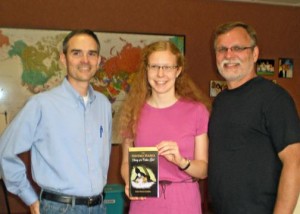
Anisa with her proof of Diary of a Cabin Girl

Eric, Anisa & Jeff

For the last couple of months I've been working with Anisa Hardin and her folks to publish her first book, Diary of a Cabin Girl. It's a Christian fiction story intended for 9-13 year-olds. On August 6th I was able to deliver the proof copy to Anisa with artist Eric Mize also on hand.

The story of 12 year old Nicole takes place in the early 18th century, she works as a cabin girl on the Storm Haven, a sailing ship. Nicole doesn't know her last name because of being separated from her family when she was very young. She writes each days' events to her diary, not realizing that she is recording the most drastic changes of her life. When she finds out what has been missing in her life, it turns out to be much more than her family.

Check availability at your favorite bookstore or purchase a copy online from;

Amazon or Barnes & Noble

Diary of a Cabin Girl is published by Koozzz Publishing of Mount Vernon, OH, it's the first book in a series titled The Heritage Diaries. I've already been briefed on volume 2 and anxious to begin working on it.

Diary of a Cabin Girl Front CoverDiary of a Cabin Girl Back CoverEric Mize was the artist providing the illustration for the book cover, he and Anisa worked together to make sure that the drawing was authentic to the period.

In downtown Columbus, Ohio we're fortunate to have a replica of the historic sailing vessel The Santa Maria. I was able to schedule a photo shoot one morning and received approval from The Santa Maria Ship Museum to use one of the images for the back cover.

Filed under: Publishing 2 Comments

Tug & Arnie Launch

Posted on July 1, 2011

Tug & Arnie, In The Gardener's Hands
July 1st, 2011 is the official launch date for Tug & Arnie, In The Gardener's Hands. It was written by new author Kyle Cook who dedicated it to his son Eli. Together with illustrator Dan Euans we collaborated to publish the first instalment of Tug & Arnie where the duo begins their adventure exploring the Gardener's tree. Read how they meet and come to know the Gardener, and discover the Biblical truths he teaches regarding true friendship and safe travels.

Title: Tug & Arnie, In The Gardener’s Hands
Author: Kyle Cook
Publication Date: Jul 1, 2011
Published By: Koozzz Publishing
Hardback ISBN: 978-0-9830760-0-1

Amazon | Barnes & Noble

Filed under: Publishing No Comments

Looks Like Our Pages Are Numbered

Posted on June 1, 2011

We enjoy reading Jeff Stahler's Moderately Confused cartoons, especially the reader caption contests that he holds each month. I thought this one from May 2011 was right on target and captured the growing popularity of e-readers and their growing impact on traditional books.

Caption Contest #35 Winner Columbus Dispatch

United Features: Jeff Stahler Bio

Filed under: ebook, Publishing No Comments

How To Create EPUB

Posted on February 1, 2011

Last month I posted about why I decided to publish an e-book for the Kindle format before any other version. This post briefly runs through the tools I used and some helpful links I found along the way in converting Fearful to Fearless to the EPUB format. 

First, what exactly is epub anyway? The short answer is that it is epub is an ebook standard defining the xml and other media and metadata that makes up an ebook. Its documented by the International Digital Publishing Forum (IDPF). 

SIGIL E-Book Editor

I use  Microsoft Office™ Professional 2003  so I needed to begin by converting it to a compatible format as a starting point. I began with the same file & format I used to create the format for Kindle, filtered html.  It's basically an html file with the Microsofty tags removed and eliminates any hard page breaks.  Here are the steps to create a filtered html from Microsoft Word™: 

  1. From the File menu, click Save as.
  2. In the Save as type box, click Web Page, Filtered.
  3. Click Save.

Next I selected all text in the document and set the style to Normal, this retained any bold, italics and indents in my document. 

The next step may seem strange seeing as how the document was just converted from Word, but I opened the filtered html file in Word and saved it to a docx format.   I have the Microsoft 2007 compatibility fixes installed to my Office 2003 version which allows you to read and write using the new 2007 format. I had attempted to convert the filtered html file directly to epub but there were still a number of resulting  errors reported, converting from docx using epubgen worked great to get thing started. 

The EPUB Code Project 

Next, you will need to visit the epub open source project at google and download a couple of programs that allow you to convert your docx or rtf document. It may seem a big complicated for a novice since these are Java programs and much of the discussion in the forum is technical in nature, but don't worry you don't need to know java to use the program, you will need to make sure you have the appropriate version of the Java Run Time Engine (RTE) installed however, you can check your computer here

Click to visit the epub-tools project page and look for the download tab/link. On the download page look for the latest epubgenx.x.x.jar file and download it. 

When you are ready to run your document through the epub conversion simply double click the jar file which will open up the epub converter window. It's not your typical windows application as there are no buttons, all you do is drag your document to convert into the "Documents" tab. Once the conversion is complete you drag and drop the new epub document to whereever you want. 

Next you'll need to download the epubcheck files, click the link to download the most current stable build and then click the zip file to download and save the most current binary version to your pc. You might see multiple versions... just grab the most current version, the one with the hightest version number. You'll need to be familiar with working from the command prompt. Before running epubcheck you'll want to run your document thorugh the next step. Al alternative would be to use the online validator from Threepress Consulting

Sigil 

The final download is for a WYSIWYG ebook editor named Sigil [screenshot]. I downloaded several programs that touted ebook converting, editing and converting but this was the only one that passed the epubcheck program which is a requirement if you want to publish in ebook format. Its still in the early stages of development but it allows you to edit, add chapters, update your table of contents and add a cover graphic among other things, plus comes with an online manual and a built in epub checker. Look to download the latest Windows setup.exe file from the Sigil project page. There is also a link to a basic tutorial which is very helpful. When I used Sigil I first attempted to use the filtered html file as the source but it produced many errors and warnings, thats why I took the time to first convert using the epubgen program and then perform the final edits and checks using the converted epub file. Be sure to run the built in epub checker that Sigil comes with, once it passes that I suggest running it by the official epubcheck utility. 

EpubCheck 

epubcheck run from command prompt

Adobe was a major initial contributor to the epubcheck utility, the epubcheck project page contains links to step by step instructions on how to setup and use epubcheck on your computer. Some of the comment threads mention online utilities that have been created however I wanted to know that I was using the latest version of the checker that was available. As mentioned earlier you will need to be familiar with working from the command prompt to be able to run this utility. 

Testing 

Once you have your validated epub document from epubcheck you'll want to test it to see how it looks in an ereader. I tested using both Adobe Digital Editions and Barnes & Nobles Nook for PC. With your epub book opened in Adobe Digital Editions you can also check to see if there are any errors by clicking on arrow and click on "Item Info". 

Helpful Links 

Here are some other helpful links I came across along the way in creating my first epub book. 

Filed under: ebook, Publishing, Tech 2 Comments

How And Why Readers Buy And Read E-Books

Posted on January 31, 2011

From the Book Industry Study Group

From the Book Industry Study Group, Inc. (BISG) comes research collected directly from book readers that addresses how print-book buyers access, purchase, and use e-books and e-readers.

The survey found that 30% of print-book buyers would wait up to 3 months to purchase the e-book edition of a book by their favorite author. The study also found the top characteristics of why consumers purchase an e-book rather than a print book to be:

  1. Affordability
  2. Easy to download
  3. Readability
  4. Instant access to book
  5. Portability
  6. Searchability
  7. Environmentally friendly.

Source: The Foster Letter - Religious Market update 1/25/2010

From Publishers Weekly

And here is a link to an article titled "It's a Digital Book World" from Publisher's Weekly that summarizes the impact e-books have on the publishing trade.

Filed under: ebook, Publishing No Comments

Espresso Book Machine Not About Espresso

Posted on January 12, 2011

The Espresso Book Machine (EBM) has nothing to do with Espresso or coffee, but everything to do with books. Print On Demand (POD) publishing has been around for a number of years, it's allowed companies such as Lightning Source & Amazon's CreateSpace to capitalize on the growing market of self & small business publishing houses by providing a gateway into the publishing business. I talked about my experiences with both companies a few months ago in this post. It's also a way for publishers to keep out-of-print titles in print by bypassing the warehousing of titles.

According to Publishers Weekly (1/3/2011) there are only about 50 set up around the world due to its high cost. But places that have it have a leg up on their competition because the entire catalogue of titles available from industry leader Lightning Source is available to print a book within minutes on-site for a customer, thereby reducing the number of titles a bookstore would need to inventory. Lightning Source recently published its 100 millionth POD book and now has a catalogue of nearly six million titles.

Widespread use of the EBM may be years off but just the thought of sending a digitized book to a site across the globe and then printing a single quality copy, for purchase is astounding.

Here is a short video of the EBM version 2.0 in action:

Filed under: Publishing Comments Off

Why I Chose To Format For The Kindle

Posted on December 20, 2010

Jump Start

Even the funny papers have mentioned Kindle! You don't suppose that means that the Kindle identity may one day be lost in the same way that Kleenex did with tissue?

I'm just about ready to jump onto the e-reader bandwagon (for reading), though I did make sure that there was a Kindle Edition of Fearful To Fearless available as more and more readers opt for e-books. I chose Kindle to publish the first e-version based on consumer acceptance and the sheer number of titles currently available, plus I've seen it in action.

With so many options for e-readers available I can't imagine publishers or authors spending resources to customize e-book source files for each and every reader out there. Michael Hyatt, CEO of Thomas Nelson Publishers had a great post a few months ago where he compared several popular e-readers.  As Michael mentioned in his post, it's only a matter of time before the field is narrowed down to a manageable number. 

I think price is probably the biggest factor that will draw consumers to the Kindle, that along with the sheer number of titles that are available make it a huge draw. Plus, I especially like the fact that there are compatible applications available for multiple platforms so you can reach a much broader audience. Amazon has made the Kindle format available to reach a larger audience by providing reading apps for iPhone, iPad, Blackberry, Android, Mac and PC.

Formatting the book for Kindle was a bit more involved than simply running your Microsoft Word™ version through a conversion program and submitting to Amazon's digital text platform. I'll try to outline the steps involved with creating the Kindle version along with some of the roadblocks I bumped into along the way in a future post.

Here is a link if you are interested in learning more about the Kindle Publishing Program and Amazon's digital text platform as well as links to guidelines and how to get started. 

The Amazon createspace is a program that allows authors and other artists to self publish and sell on Amazon. As an author as well as publisher you can also sign up for Search Inside that allows a percentage of your book to be viewed on Amazon.

An earlier post provided a few details on publishing through CreateSpace and Lightning Source.

Filed under: ebook, Publishing No Comments